
Google Search Console Help: How to Triage Emails and Warnings
Google Search Console help for busy owners: what each email and warning usually means, which ones to ignore, and where to get free help before you pay anyone.
From F&B to fintech, clinics to law firms, startups to enterprise. If your customers search on Google, we make sure they find you first, not your competitors.
One specialist team, focused only on the organic rankings that put you in front of ready-to-buy Singapore customers.
A clear, sequenced path from audit to rankings. You always know what we’re doing and why it matters for your leads.
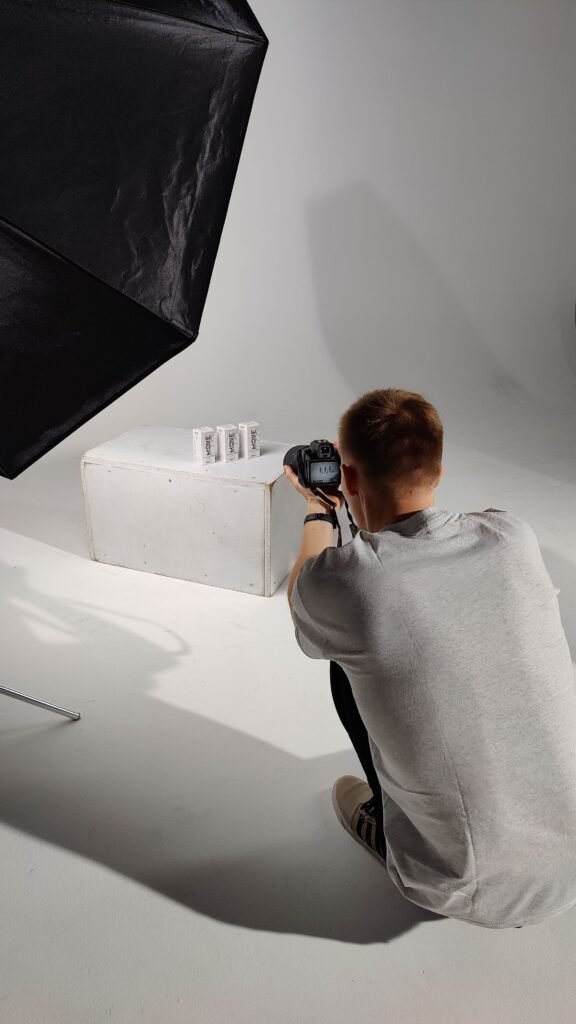
Quick answer: Shopify image SEO Singapore stores need combines descriptive file names, keyword-rich alt text, and compressed WebP images that load fast on mobile. Shopify’s built-in CDN handles resizing automatically, but store owners still need to name files, write alt text, and manage image weight themselves for real ranking gains.
Shopify image SEO Singapore stores need is frequently the most neglected part of an otherwise well-built store, because product photography is treated purely as a conversion tool and never revisited as a search visibility opportunity. Every product image is a potential entry point into Google Images search, and for visually driven categories like fashion, furniture, and beauty, which make up a large share of Singapore’s Shopify merchant base, Google Images traffic can be a genuinely meaningful acquisition channel that most stores leave almost entirely untapped. When we review image libraries through our ecommerce SEO engagements, we tend to find the same three gaps: generic file names straight from a camera or supplier feed, alt text (a text description attached to an image for accessibility and search purposes) that is either missing or copy-pasted identically across every variant, and unnecessarily large image files slowing down mobile load times. This guide covers how to fix all three at catalogue scale, not just on a handful of hero images.
Every image uploaded to Shopify keeps whatever file name it arrived with, and for most merchants that means a string like “IMG_4521.jpg” or a supplier’s internal SKU code with no descriptive value whatsoever. Google’s image search algorithm uses file names as one of several signals to understand what an image depicts, alongside surrounding page text and alt text. A file named “img4521.jpg” tells Google nothing. A file named “rattan-storage-basket-medium-natural.jpg” tells Google exactly what it is looking at before it even reads the alt text.
The practical challenge for Singapore stores is doing this at scale. A merchant with 400 products and three to five images per product is looking at over 1,500 individual files to rename, which is not realistic to do manually one by one. The workable approach is building file naming into your product upload workflow from the start, either through a consistent naming convention applied before bulk upload via Shopify’s CSV import, or through a bulk image editing app that can batch-rename based on product title and variant attributes. Retrofitting file names onto an existing catalogue of thousands of images is more work, but even prioritising your top 50 to 100 best-selling products first captures most of the available benefit without the full-catalogue effort.
We found that stores selling through multiple channels, listing the same products on Shopify alongside Lazada, Shopee, or Qoo10, often already have reasonably descriptive file names in their supplier or marketplace feeds, simply because those marketplaces enforce stricter naming and content rules than Shopify does. If your business already sells on those platforms, it is worth pulling from that existing asset library rather than starting file naming from scratch on Shopify, since the descriptive groundwork has frequently already been done for another channel and just needs to be carried over.
Alt text serves two separate purposes that Singapore merchants often conflate: it is read aloud by screen readers for visually impaired shoppers, making it an accessibility requirement, and it is a ranking signal Google uses to understand and surface images in search. Good alt text does both jobs at once, which means it needs to be descriptive and specific, not just keyword-stuffed.
The mistake we see most often is either leaving alt text completely blank, which Shopify allows by default, or writing the exact same alt text across every variant of a product (“blue leather handbag” repeated identically for the black, tan, and red versions too). Neither serves shoppers or search engines well. A better pattern includes the specific variant attribute, a relevant descriptive detail, and where natural, the product category: “tan leather crossbody handbag with gold clasp” rather than just “handbag.” For stores with large catalogues, writing genuinely unique alt text for every single image is not realistic, but writing unique alt text at the product level (one description per product, reused sensibly across that product’s own image angles) is a workable middle ground that most Shopify apps and bulk editors can handle efficiently. Our beauty SEO work in particular has shown how much visual search matters for product categories shoppers research heavily before buying.
In our experience, stores that sell in visually driven categories often see the clearest early gains from this fix, likely because their shoppers are already searching visually well before they search by brand or product name. A shopper searching “rattan pendant light Singapore” through Google Images is frequently still in the comparison stage of buying, and a well-described, properly alt-tagged image is often the first genuine touchpoint that store gets with that shopper, well before any product page click happens. Photos matter for local visibility too: our beauty SEO results case study shows how a photo-led approach, with 54 new geo-tagged photos on the Google Business Profile and compressed, lazy-loaded site images, supported a Dempsey Hill day spa’s visibility.
Fashion and homeware follow a similar logic, though the specific search behaviour differs slightly. Fashion shoppers tend to search by style descriptor (“oversized linen blazer”) more than by exact product attribute, while homeware shoppers search by room and material combination (“rattan pendant light living room”). Tailoring alt text to reflect how shoppers in your specific category actually phrase their visual searches, rather than using a single generic template across every product type in a mixed catalogue, meaningfully improves how often your images surface for the searches that actually convert.
Shopify runs all store images through its own content delivery network (CDN, a distributed system of servers that delivers images from a location physically closer to the shopper for faster loading), and it does automatically serve resized and next-generation formats like WebP to browsers that support them. This is a genuine advantage over self-hosted platforms where merchants have to configure this manually. Contrary to what some Shopify SEO advice suggests, you do not need a separate WebP conversion app just to get modern image formats served to your visitors, Shopify’s CDN already does this.
Where merchants still need to take action is at the source: the original file uploaded to Shopify. If you upload a 12-megapixel, 8MB photo straight from a DSLR camera without any compression, Shopify’s CDN will resize it for display, but the underlying file weight still affects how much data needs to be processed and can slow down the initial upload and, in some theme configurations, the largest image variant served. The practical standard we recommend for Singapore Shopify stores is compressing product photography to a reasonable file size, generally under 500KB per image before upload, using a tool like TinyPNG or built into your photo editing workflow, while keeping visual quality high enough that zoom and detail views still look sharp. This balances load speed against the image quality that actually drives conversion for considered purchases.
Singapore’s e-commerce traffic is overwhelmingly mobile, and mobile shoppers are far less patient with slow-loading pages than desktop users, often abandoning a product page that takes more than a few seconds to fully render. This creates a genuine tension for image-heavy categories: furniture, fashion, and home goods shoppers want to see multiple angles and zoom-in detail before buying, but every additional high-resolution image adds load weight.
The approach that works best in practice is not minimising image count, which tends to hurt conversion for considered purchase categories, but managing image weight aggressively while keeping image count generous. This means compressing every image before upload rather than relying solely on Shopify’s CDN resizing, using lazy loading (a technique where images below the visible screen area load only as the shopper scrolls to them rather than all at once) which most modern Shopify themes support natively, and limiting oversized hero banner images and homepage carousels, which are frequently the heaviest, least-optimised images on the entire site despite carrying the least individual SEO value compared to product images. We consistently find that homepage and collection banner images, not product photos, are the biggest single contributor to slow page speed scores when we run technical audits, which is a pattern worth checking on your own store’s technical SEO performance report.
The widely repeated advice to simply “reduce the number of product images” to improve speed is, in our experience, frequently the wrong fix applied to the wrong target. We often see Singapore Shopify stores where a single unoptimised homepage carousel weighs more than the entire product gallery on a full collection page. Cutting product images in that scenario would sacrifice conversion for a negligible speed gain, while fixing the carousel would solve the actual problem. Diagnosing which images are genuinely responsible for slow load times, rather than assuming it must be the product photography, is worth doing before you cut anything from your listings.
The single biggest determinant of whether a Shopify store’s image SEO stays good over time is whether it is built into the standard product upload process, rather than treated as a one-off cleanup project. Stores that fix everything in a single sprint and then revert to uploading unnamed, un-alt-tagged, uncompressed images for every new product launch are back to square one within a few months.
The fix is procedural rather than technical: build a short checklist into whatever process your team uses to add new products, whether that is a dedicated staff member, a freelancer, or the store owner themselves, covering file renaming before upload, alt text written at the point of product creation rather than retrofitted later, and a compression step run automatically or manually before any image reaches Shopify’s media library. For stores using a product information management workflow or bulk CSV uploads, this can largely be automated. For smaller stores adding products manually a few at a time, it takes discipline but adds only a few extra minutes per product, a small cost against the compounding search visibility it builds over time. This is the same operational thinking we bring into ongoing ecommerce SEO retainers, where image SEO is checked as part of every new collection launch, not just at onboarding.
Field notes: In our law firm case study, image compression was one of three technical fixes, alongside render-blocking JS deferral and font loading optimisation, that lifted a Tanjong Pagar firm’s mobile Lighthouse score from 52 to 81. Image weight is rarely the only issue on a slow site, but it is usually the easiest one for a Shopify store owner to fix themselves.
| Image SEO Element | Handled by Shopify Automatically | Requires Merchant Action |
|---|---|---|
| Responsive resizing (CDN) | Yes | No |
| WebP / next-gen format serving | Yes | No |
| File naming | No | Yes, before or at upload |
| Alt text | No | Yes, per product |
| Source file compression | No | Yes, before upload |
| Lazy loading | Mostly, theme-dependent | Verify theme support |
A real example comes from our medical case study, a GP clinic in Toa Payoh rather than a Shopify store. The initial audit found uncompressed images loading at three to four times their required size, alongside crawl errors and no schema markup. In Months 1-2 we compressed and lazy-loaded all images as part of a wider technical foundation phase, and Core Web Vitals moved from failing to passing across all three metrics by the end of Month 2. Image weight was one fix among several, but it shows how much speed is often hiding in photos nobody has revisited since they were first uploaded.
Product photography is one of the few SEO assets a Shopify store already invests heavily in creating, which makes it frustrating to see so much of that value left on the table through missing alt text and unnecessary file weight. In our experience, image SEO is also one of the fastest wins available to a Singapore Shopify store precisely because the hard part, having good product photos, is usually already done. What is missing is the structured, repeatable process around naming, describing, and compressing those images properly. If you want a full audit of how your current image library is performing against these standards, our SEO consulting and audit service covers this as part of a broader technical review.
Scoping and cost naturally vary by catalogue size and how much of the groundwork is already in place, and our pricing page outlines how this kind of work is typically structured for Singapore Shopify merchants of different sizes.
You can read more about how our team approaches technical and visual SEO work generally on our about page.
Shopify automatically resizes images and serves modern formats like WebP through its built-in CDN, which handles technical delivery well. It does not automatically write alt text, rename files descriptively, or compress your original source files before upload, all of which remain the merchant’s responsibility.
Use descriptive, hyphenated file names that reflect what the image actually shows, including product type and key attributes like colour or material, for example “oak-dining-table-6-seater.jpg” rather than a generic camera file name or SKU code with no descriptive value.
Generally one short, descriptive sentence or phrase, around 8 to 15 words, is enough. It should describe what is visually in the image accurately, including relevant product attributes, without stuffing in unrelated keywords that do not reflect what is shown.
No, in most cases. Shopify’s built-in CDN automatically serves WebP or other next-generation formats to browsers that support them, regardless of what format you originally uploaded, so a dedicated conversion app is generally unnecessary for this specific function.
It varies by starting point, but stores with large, uncompressed source images often see meaningful improvements in load time metrics after compression, particularly on mobile connections. Combined with lazy loading, this is frequently one of the highest-impact, lowest-effort technical fixes available.
Ideally each product should have its own descriptive alt text reflecting that specific item, reused sensibly across that product’s own angle shots. Writing entirely unique alt text for every single image across a large catalogue is not usually realistic, but avoid copy-pasting identical text across different products.
Yes, for visually driven categories like fashion, furniture, and beauty, Google Images can be a genuine traffic source, particularly for shoppers researching a product visually before deciding what to search for by name. This channel is frequently under-optimised and left almost entirely untapped.
A reasonable target for most product photography is under 500KB per image before upload, while keeping enough resolution for zoom and detail views to remain sharp. Extremely high-resolution unedited camera files, often several megabytes each, are rarely necessary for on-site display purposes.
For image-heavy, visually researched categories, it can matter just as much, since a significant share of pre-purchase research for those products happens visually. For text-heavy or highly technical product categories, written content SEO typically carries relatively more weight, though both remain worth optimising properly.
Not usually as a first step. Oversized homepage banners and carousels are far more often the real cause of slow load times than product galleries, so it is worth diagnosing which specific images are heaviest before cutting product photos that support conversion for considered purchases.
Shopify’s CDN primarily serves WebP as its next-generation format for browsers that support it, which covers the vast majority of current traffic. Broader AVIF support across the platform has been more limited and inconsistent across themes, so WebP remains the more reliable format to plan around for now.
If you are not sure how much of your Shopify store’s image library is actually search-optimised, we offer a free SEO audit that includes a full image SEO review across file names, alt text, and compression. Get in touch through our contact page to arrange one.
Natalie leads SEO strategy at Singapore SEO Agency, helping local and regional businesses build organic search programmes that drive qualified leads. She specialises in technical SEO and content-led authority building for Singapore SMEs.
Get a free SEO audit for your Singapore website — we'll show you exactly where you stand, what's holding you back, and what it would take to rank on page 1.
Get Your Free SEO Audit →Google Search Console help for busy owners: what each email and warning usually means, which ones to ignore, and where to get free help before you pay anyone.

Domain authority is a useful filter for weak sites but a poor sales promise. Learn why scores move on their own and what to ask before you buy links or SEO.

Paying for an SEO keyword research tool? Test its Singapore data on 20 keywords you know, see why KD differs by vendor, and pick one tool you can stick with.

Whats bounce rate, and how is it different from exits, engagement time or dwell time? Learn what each one really answers and what to ask your SEO agency.

Google Analytics website traffic is a consented sample, not a head count. See where visits come from, why tools disagree and which number to trust each month.

Google analytics consulting services for Singapore SMEs: what consultants do, indicative SGD costs, deliverables to demand and red flags. Buy the right scope.
Fast, no obligation. We reply within 24 hrs.
Singapore’s specialist SEO agency for SMEs. We rank your business on Google — and only Google. No distractions, just results.
© 2026 Singapore SEO Agency. All rights reserved.